The prompt carries too much weight
A blank AI box asks you to remember your audience, tone, goal, topic, and format every time. Miss one piece and the output gets vague fast.
TweetWizard is a context-first workflow for X. TweetWizard onboarding starts with your connected account, persona setup, and TweetWizard voice and audience context, then uses the 7-aspect idea formula to generate angles you can draft, review, schedule, and publish.
The TweetWizard workflow
Start with free credits and no credit card. You set context first, then review the generated drafts before anything reaches the schedule.
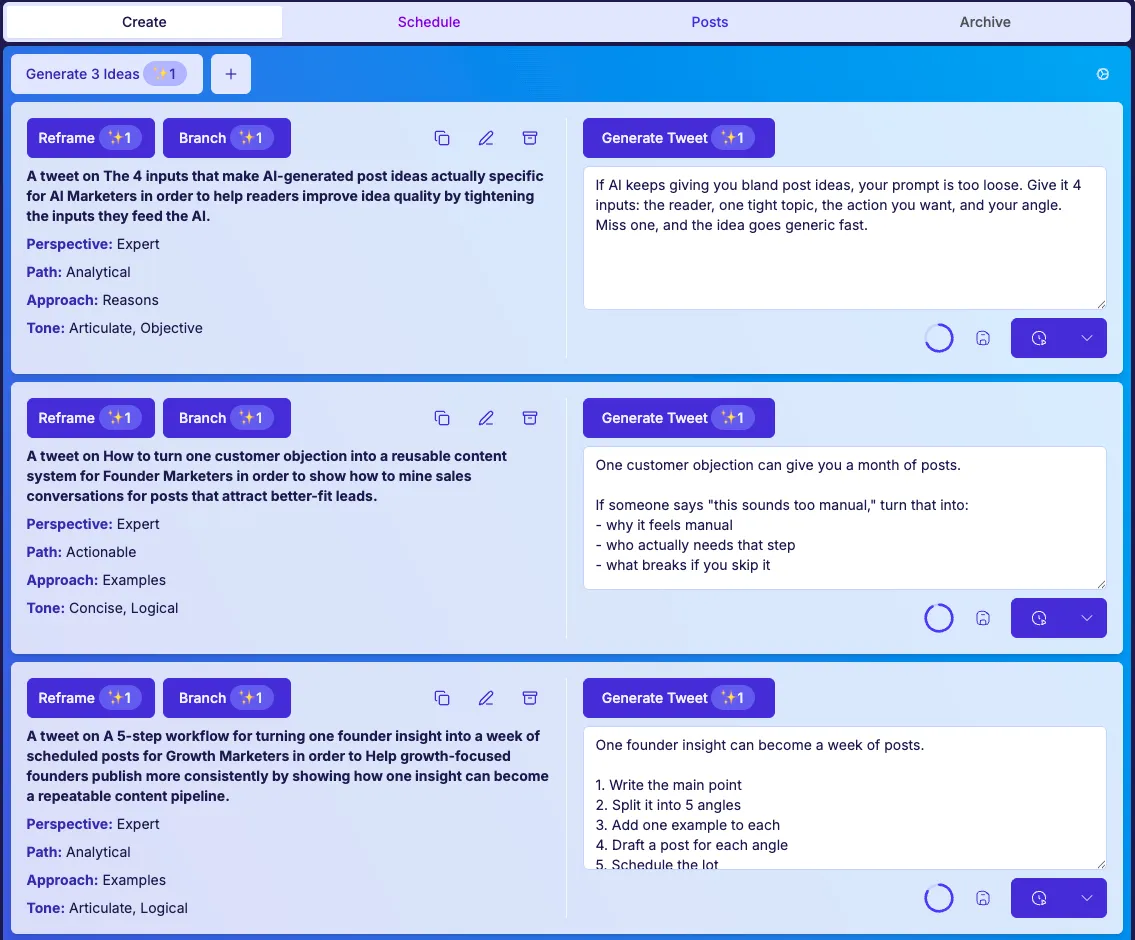
The method matters because each step gives the next step better context: profile setup improves ideas, ideas improve drafts, and reviewed drafts improve the schedule.
Most AI writing tools start after the hard thinking should already be done. TweetWizard starts before the prompt, so the generator and scheduler both inherit clearer context.
A blank AI box asks you to remember your audience, tone, goal, topic, and format every time. Miss one piece and the output gets vague fast.
One-off generators can produce polished sentences that still have no point of view. TweetWizard content context gives the generator a job before it writes.
If ideation and scheduling are separate, every week begins with the same question: what should go in the queue? TweetWizard keeps ideas, drafts, and timing connected.
The TweetWizard setup process is intentionally short, but it changes the quality of everything downstream: ideas, drafts, rewrites, and the scheduler queue.
TweetWizard persona setup captures the context that should not live inside a fresh prompt every session: who you are writing as, who you are trying to reach, and what you want the account to become known for.
TweetWizard changes more than the topic. It varies the audience, goal, perspective, path, approach, and tone so one source idea can become several useful post angles.
The draft starts from an angle you approved, not a blank composer. That makes the AI tweet generator easier to steer and easier to edit because the post already has a purpose.
Finished drafts move into the scheduler so the queue is fed by reviewed ideas instead of last-minute effort. Publish now when timing matters, or schedule posts for a cadence you can maintain.
Complete setup, generate a few angles, review the drafts, and move only approved posts into the queue.
TweetWizard was built around a specific problem: one topic rarely gives you enough useful angles on its own. The formula gives the generator more levers to pull.
Topic + Audience + Goal + Perspective + Path + Approach + Tone
Change the combination and the post changes with it. The angle feels fresh because the job of the post has changed.
This is why the TweetWizard workflow creates a backlog instead of a single draft. Keep the source topic, change the audience or goal, and the generator has a different reason to write.
Input: A founder shipped a faster onboarding flow after seeing trial users stall before profile setup.
Formula: Topic: onboarding friction | Audience: bootstrapped founders | Goal: teach one launch lesson | Perspective: operator | Path: actionable | Approach: before and after | Tone: direct
Draft direction: A usable angle becomes: We cut one onboarding step only after watching where trial users hesitated. The lesson is not 'shorter is better.' It is: remove the step that delays the first useful result.
From there, the user can rewrite the hook, keep the operator voice, and schedule the post only after review.
Topic
What is the post about?
A founder launch update
Audience
Who needs this angle?
Other bootstrapped founders
Goal
What should the post accomplish?
Show the lesson behind the launch
Perspective
What point of view should lead?
Operator
Path
How should the post move?
Actionable or analytical
Approach
What shape should the post take?
How to, lessons learned, teardown
Tone
How should it sound?
Direct, useful, grounded
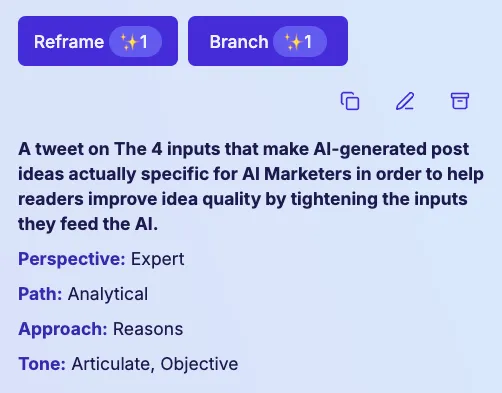
A tweet about a launch update for bootstrapped founders that helps explain one decision that made the launch easier.
Path: Actionable | Approach: Lessons Learned | Tone: Direct
A tweet about a launch update for creators and builders that helps invite replies about how they decide what to ship first.
Path: Conversational | Approach: Question | Tone: Curious
A tweet about a launch update for prospects who feel the same workflow pain that helps connect the launch to the problem the product solves.
Path: Analytical | Approach: Before and After | Tone: Clear
TweetWizard does not rely on a smarter prompt alone. The method improves the inputs, carries decisions forward, keeps reply drafts in context, and makes the queue the result of reviewed work.
Profile, persona, audience, and content context narrow the search space before generation starts. That is why TweetWizard can produce more relevant ideas than a blank prompt.
See the AI Tweet GeneratorThe selected idea carries a goal, audience, perspective, and tone into the draft. Rewrites improve the post instead of trying to discover the point from scratch.
See the AI Content WorkflowThe same account, voice, and audience setup follows into the browser extension, so replies drafted in X still start from the workspace context you reviewed.
See the Chrome ExtensionA queue works better when it is filled with posts you already chose and edited. TweetWizard turns scheduling into the final step of the workflow, not an empty calendar.
See the Tweet SchedulerFounders, creators, managers, and ghostwriters use different source material, but they all need the same loop: context, angles, drafts, review, and scheduling.
Use these answers to decide whether TweetWizard's setup, idea formula, review loop, and scheduler fit the way you want to publish on X.
Go deeper on the specific part of the method you are evaluating next.
Create your account, connect X, complete the short profile setup, and test how context turns into ideas, drafts, and scheduled posts.
No credit card required. Free credits to explore. Cancel anytime.